Why your Moodle pages feel slow: a working triage list
Database, OPcache, cron, geography, that one auto-linking glossary — the ten places we actually look when a Moodle™ admin emails to say "everything feels sluggish". With the order we check them.
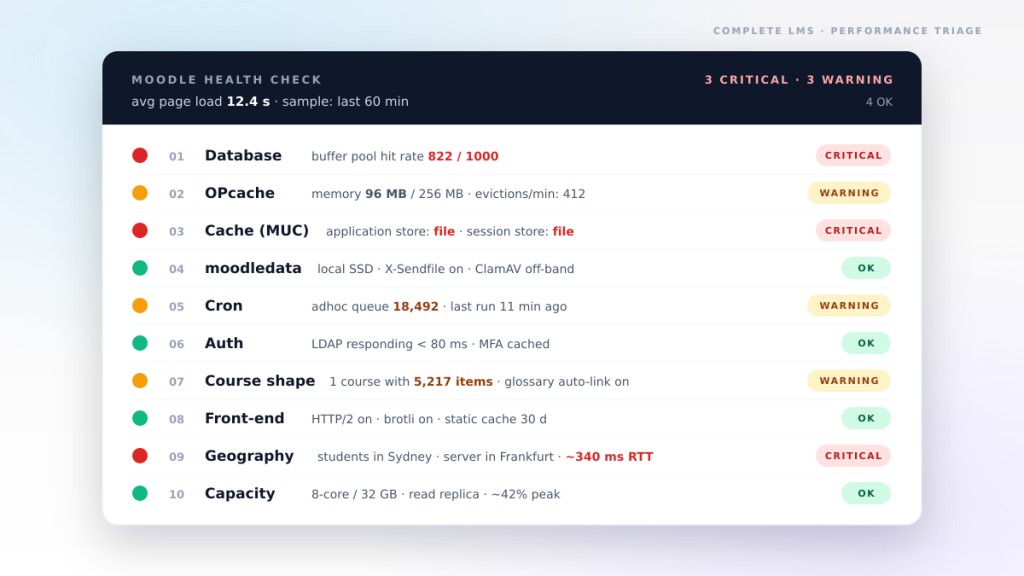
Every September the same email arrives. It is roughly: "Things were fine in July, but since classes started everything feels slow. The grader report takes forever, students are complaining the course page won't load, and we don't know if it's the server or something else." Sometimes the team has already thrown more CPU at the box. Sometimes they've migrated to a bigger VPS and the problem moved with them.
"Slow Moodle™" is rarely one thing. It's usually five small things lined up against each other. The order matters, because the cheap fixes are towards the top of this list and the expensive ones sit at the bottom. This is the rough order we follow when a client asks us to look at a sluggish Moodle™ — what we actually check, and roughly in which order.
1. The database, almost always
If you only have time to investigate one thing, investigate the database.
Almost every slow Moodle™ we have ever been called in to look at had a database that was either undersized, mis-tuned, or under lock contention from a query nobody noticed.
innodb_buffer_pool_sizeleft at the MariaDB default of 128 MB. Set it to ~60–70% of the database server's RAM and you usually feel the difference inside ten minutes.- Missing or fragmented indexes after a major upgrade or restore. The usual offenders are
mdl_logstore_standard_logandmdl_grade_grades. A plainOPTIMIZE TABLEhas cut average query time in half on a restored database. - A single long-running query holding a row lock — almost always somebody hitting the grader report on a large course while course completion is recalculating. Look at MariaDB's process list during peak.
mdl_sessionsgrown to millions of rows because cron has not been cleaning it.
Quick check: run SHOW ENGINE INNODB STATUS. If the buffer pool hit rate is below 990 / 1000, that is your starting point.
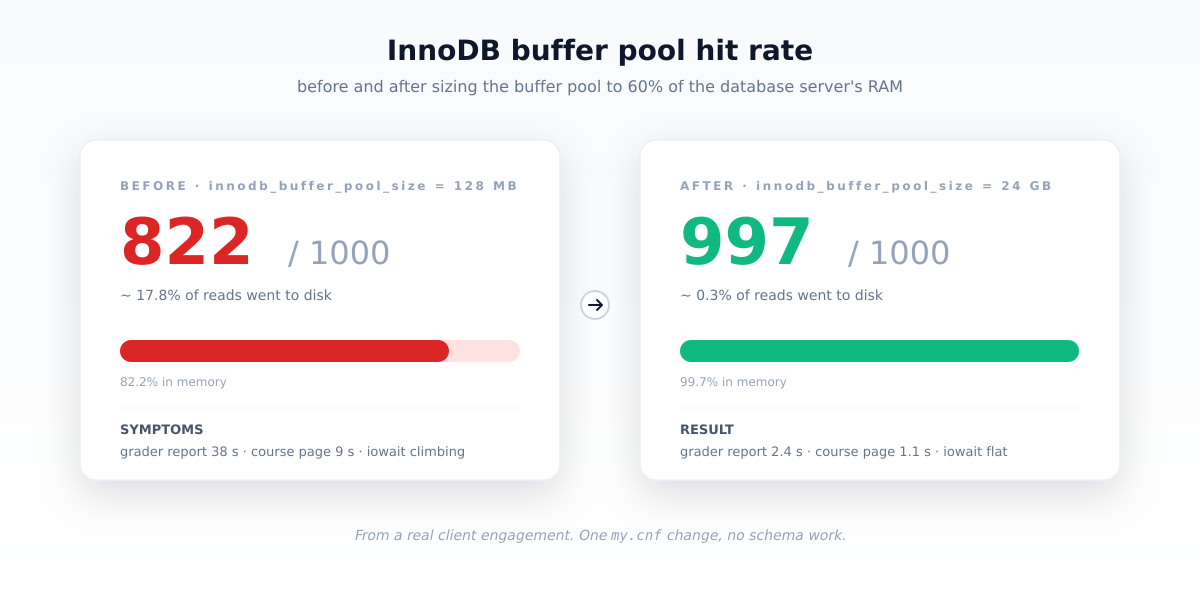
my.cnf change, no schema work.2. OPcache and PHP-FPM
The second-most-common quiet killer.
PHP recompiles every PHP file it loads unless OPcache catches it. Moodle™ loads a lot of PHP files.
opcache.enable = 1,opcache.memory_consumptionat least 256 MB on a real install.opcache.revalidate_freq = 60in production. Setting it to 0 means PHPstat()s every file on every request.opcache.max_accelerated_filesof 16,229 or higher — Moodle™ has a lot of files and too low a limit causes constant cache eviction.
While you are in PHP, look at PHP-FPM:
pm.max_childrenrealistic for the box. Too low and requests queue silently; too high and the box runs out of memory.- Check the FPM slow log. Requests over 5 seconds in there usually point straight at a problem method.
3. The application cache, theme cache and session store
Moodle's MUC (Moodle Universal Cache) defaults to file storage. Fine for a small site; not fine for anything real.
- Application cache on Redis or Memcached. Moodle™ hits the cache dozens of times per request, so this matters.
- Session storage on Redis. Stops session files piling up on disk and prepares you to scale horizontally later.
- Theme designer mode OFF in production. "Designer mode" means "recompile SCSS on every request". The setting is in Site administration → Appearance → Themes → Settings.
$CFG->cachejs = true. Default is true in modern Moodle™, but we have seen it disabled by a debugging session that was never re-enabled.
4. moodledata, filesystem and antivirus
moodledata holds every file Moodle™ has. If it is slow, everything is slow.
moodledataon slow disk, or NFS without sensible attribute caching. NFS works, butactimeodefaults are usually wrong for Moodle's access pattern.- ClamAV scanning every file inline. ClamAV is good. ClamAV invoked synchronously on every upload (and every read, in some configs) is a performance disaster. Use
clamonaccor schedule it. - The filedir hash tree out of balance after a careless backup restore.
du --max-depth=2 moodledata/filedir— top-level shards should be roughly equal. - No X-Sendfile. Without it, PHP streams every download byte through PHP-FPM. Turn on
X-Sendfile(Apache) orX-Accel-Redirect(Nginx) and tell Moodle™ about it in Site administration → Server → Performance.
5. Cron and background work bleeding into requests
Moodle™ has a lot of work that is supposed to happen in the background. When that work doesn't happen, or happens at the wrong time, it spills into the user-facing path.
- Cron not running, or running every 15 minutes and falling behind. We see
mdl_task_adhocwith tens of thousands of rows on sites where someone "noticed cron was slow" and turned it off. - Search index rebuild running mid-day instead of overnight.
- Course completion recalculation triggered during exam week.
- The plugin updates checker calling moodle.org on a slow connection and stalling the rest of cron.
Quick check: Site administration → Reports → Scheduled tasks. Anything running longer than its interval is stealing time from everything else.
6. Authentication and external services
Every page Moodle™ serves usually checks at least one external service. If that service is slow, Moodle feels slow — but the cause is half a world away.
- LDAP or SAML IdP slow, unreachable, or rate-limited. Every page waits for it.
- Repository integrations (OneDrive, Google Drive, S3) timing out when teachers open the file picker.
- LTI tool launches calling slow providers.
- An MFA provider being hit on every navigation, not just login.
If teacher complaints cluster around the file picker or single-sign-on, look here before the database.
7. Course shape — the things teachers feel first
Some "slow Moodle" complaints aren't about the platform at all. They are about one specific course, designed in a way that exercises Moodle's weak spots.
- A single course with thousands of activities and resources. The course page is roughly O(n) in items; in the thousands, it shows.
- Glossary auto-linking enabled with a 10,000-entry glossary. Every string on every page now gets filtered. Disable auto-linking, or scope it.
- Forum subscription emails generated synchronously — an announcement to a course of 2,000 students stalls for minutes.
- Quiz attempts with hundreds of questions and adaptive feedback. Render time scales badly. Sometimes the right answer is to split the quiz.
- A 90 MB SCORM package in a course's main section, served through PHP rather than via the file pool.
These are course-design problems, not server problems. The fix is in the course, not the hardware.
8. The front-end and the edge
A lot can still go wrong on the way back out to the user.
- HTTP/2 (or HTTP/3) not enabled at the front edge — every theme asset paying a fresh connection cost.
- gzip or brotli off. Moodle pages are mostly HTML; they compress beautifully.
- Static asset cache headers missing — the theme CSS being refetched on every visit, which makes the browser feel slow even when the server is fine.
- A heavy front-page dashboard block (calendar, latest posts, recently accessed) doing N+1 queries.
- A custom theme with autoplay video on the front page, or a three-megabyte hero image.
If everything else checks out but the first paint feels slow, this is usually it.
9. The server is too far from the audience
This is the one almost nobody checks.
Network latency adds up faster than people expect. A round trip from Sydney to a data centre in Frankfurt is roughly 300 ms. A page that needs four serial requests to render (HTML, theme CSS, a couple of XHRs) now has a one-second floor before the server has done any work at all. From a remote part of Indonesia or West Africa to a US-East data centre, the per-round-trip cost is often worse, and an exam day full of students on patchy mobile connections turns into a parade of "Moodle is broken" tickets.
The same applies in reverse. We routinely see Australian institutions running their LMS on a US server because "AWS was easy" — and then wondering why pages feel sluggish. Latency from Sydney to us-east-1 is around 220 ms. Each way.
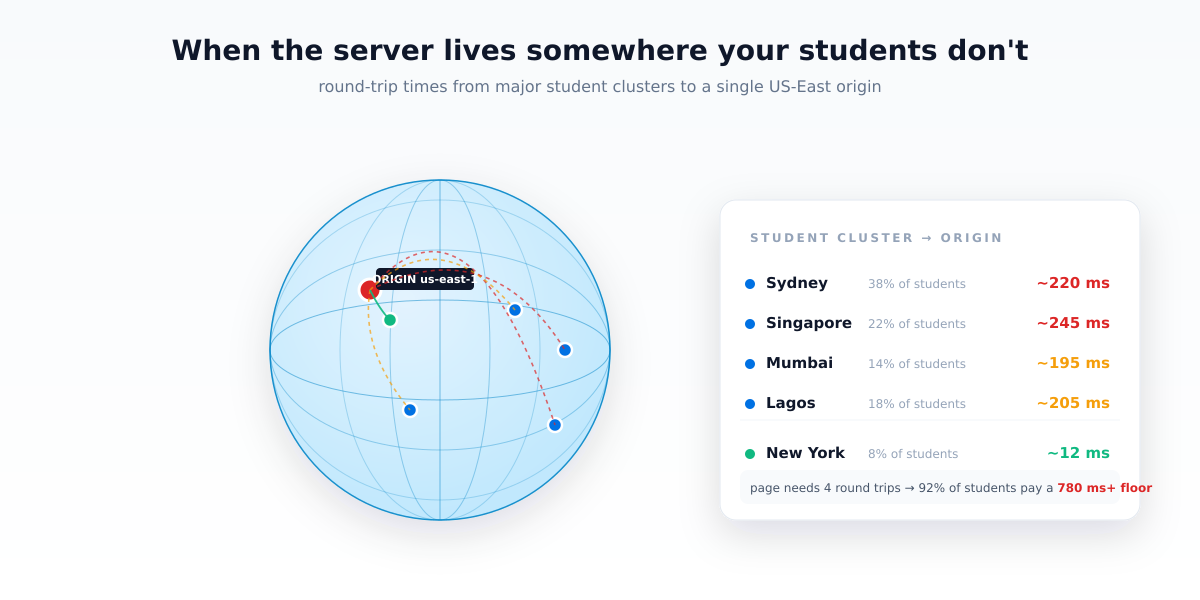
The fix is not always a CDN — Moodle pages are highly personalised, so most of the HTML cannot be edge-cached. What actually moves the needle:
- Host the origin in the same region as the majority of your users. If 80% of your students are in South-East Asia, hosting in Mumbai or Singapore is the cheap, decisive win.
- Use a CDN for static assets — theme CSS/JS, course images, plugin assets. Those can be edge-cached, and they are a real share of bytes per page.
- TLS session resumption on at the edge, so returning users don't pay for a full handshake on every fresh tab.
- For multi-region institutions, a read replica in a second region plus a smart load balancer helps — but it's a project; the in-region option is almost always tried first.
If the database is fine and OPcache is fine and the request is still slow, run mtr from a student's location to the server and look at where the time actually goes. It is often the boring answer.
10. Capacity and architecture (the expensive end)
Last because it is the one teams usually want to be the answer — it justifies a budget. It rarely is, on its own.
- One web node trying to serve more than ~300–500 concurrent users at peak.
- No read replica; teacher reports run on the primary and lock everything else.
- Container CPU/memory limits silently throttling at peak (especially on Kubernetes deployments with conservative defaults).
- Shared hosting with a noisy neighbour.
- A WAF or security plugin inspecting every request body, including big assignment uploads.
If you've worked through items 1 to 9 and the platform is still sluggish, now it is time to look at capacity. The honest answer is that most institutions are not throughput-bound; they are database- and cache-bound, and another web node won't help.
How we triage on a real call
The order is roughly:
- Read the database tunables and run
SHOW ENGINE INNODB STATUS. - Read
/etc/php/*/fpm/php.inifor OPcache, look at the FPM slow log. - Inspect MUC store config and the theme designer setting.
- Cron health and adhoc queue depth.
- The server's physical distance from the user base.
The first four are almost always the answer. The fifth catches institutions where the server has been growing comfortably in a continent the students don't live in.
If pages on your Moodle™ are crawling and you'd rather have someone else read the slow logs, talk to an engineer — we will do the first hour for free and tell you honestly which of these ten you should fix first. See our managed LMS hosting and upgrades & maintenance services for the longer engagements.